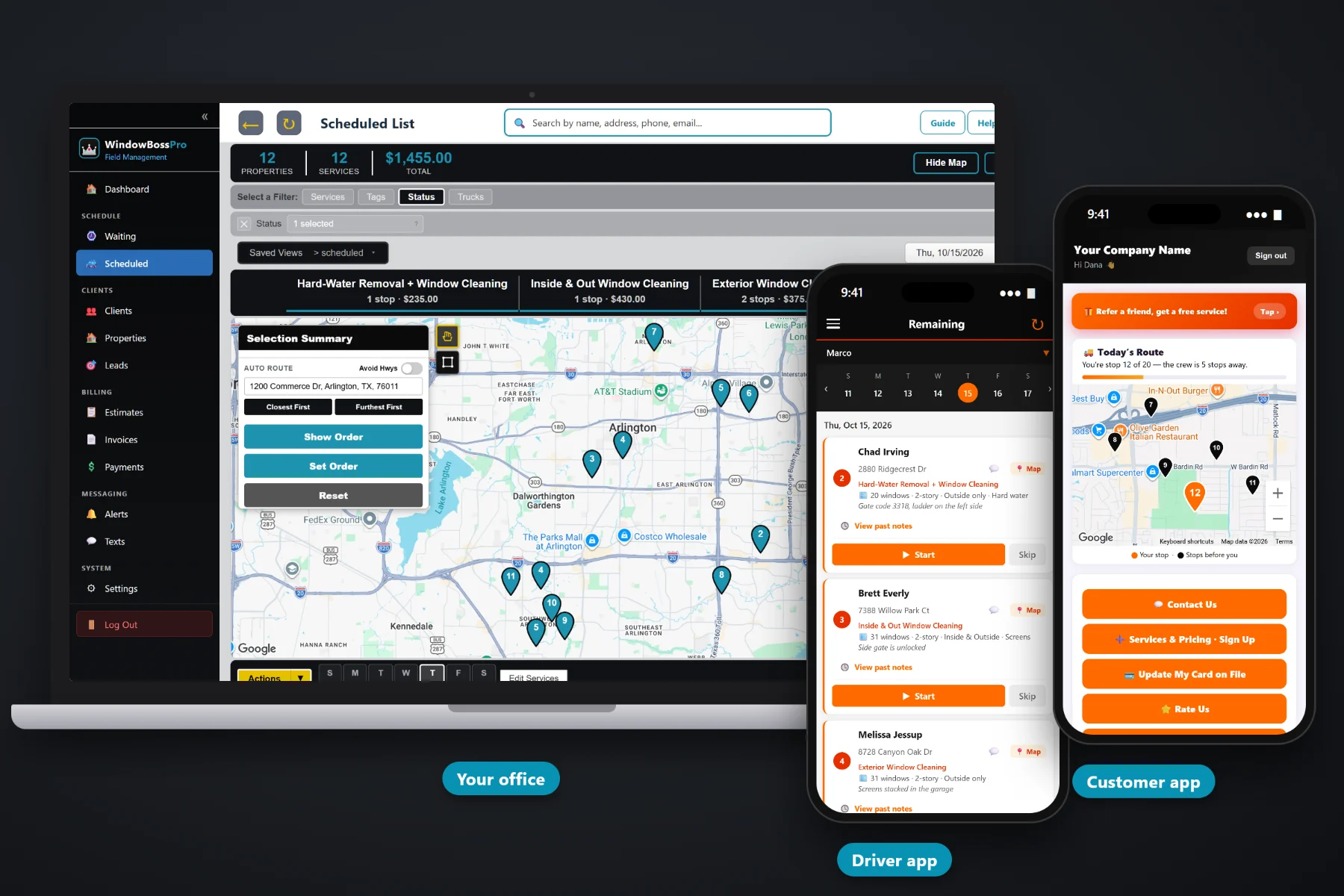
Window cleaning runs on details: how many windows, how many stories, inside or out, screens or no screens, and which gate the dog is behind. WindowBossPro keeps those details on every job and carries them from the first quote to the paid invoice — approved estimates become scheduled cleanings, recurring cleanings come due on their own, each van gets a route, the tech's phone shows the window details, and the card on file is charged when the glass is done.
Plans start at $59/month and you are never billed per user, so the owner, the office and every tech on the ladder can be in the system. Quotes, recurring cleanings, routes, the tech app, the customer app, texting and billing are part of the platform, not add-ons. For the full product tour, start at WindowBossPro, then use this page and its guides to understand what window cleaning software should do for you.
Estimates built from your own service list. The customer approves online and the work becomes scheduled services.
“28 windows · 2-story · Inside & Outside · Screens” under the address, on every list and every phone.
Storefronts monthly or every two weeks, homes quarterly or twice a year. They come due on the Waiting List by themselves.
Assign jobs to a van and a day, auto-route Closest First or Furthest First from the shop, and set the order.
Techs see the day in route order. Customers see where they are on the route, pay invoices and request service.
Complete creates the invoice and can charge the card on file. Property managers get one monthly statement.
A generic job card says an address and a time. A window cleaning job needs more: the window count, the number of stories, which sides get cleaned, the extras the customer paid for and how to get to the back of the house. WindowBossPro records that once on the job and shows it on the office lists and the tech's phone, so nobody re-asks the customer and nobody cleans the wrong side of the glass.
You should not have to stop cleaning glass for a month to set up software. WindowBossPro is set up for window cleaning from the first login, so the work is putting in your services and customers, not building the system from scratch.
Per window, per screen, story add-ons, hard-water removal, storefront visits. Your prices, your names.
Import a CSV or add them by hand. One client can have many addresses, each with its own window details.
Add employees with a personal PIN and assign vans. You are never billed per user.
Pull due cleanings off the Waiting List, assign them to a van and day, auto-route, and send the tech out.
Most window cleaning companies start with a notebook, a spreadsheet and a phone full of texts. It works while the owner does every job. It stops working the day a second person has to know what the owner knows.
Ask any window cleaner how the books really run and you hear the same story: quarterly customers tracked in a spreadsheet nobody updates, storefronts remembered by driving past them, a quote written on the back of a business card and a gate code in a text thread from last spring. Whether the Johnsons get inside and outside or just outside. Whether the screens were on the quote. Whether anybody sent the invoice.
All of that belongs on the job, not in one person's head. When it lives in the software, cleanings come due on their own, any tech can run any route and the money gets collected without a Sunday-night invoicing session.
WindowBossPro keeps the customer, the address, the window details, the schedule and the payment in one place.
Every piece here covers a step in the life of a window cleaning job, from the first website request to the cleaning that comes due again next quarter.
Built from your service list: per window, per screen, story add-ons, hard water. Approved online by the customer.
Website request and sign-up forms flow into Form Responses. One click turns a sign-up into a client.
Windows, stories, sides, extras and access notes on every job.
Set by minimum days between visits: 14, 30, 90 or 180. One-time jobs too.
Every cleaning that came due on a live map, pins colored not due yet, due now and overdue.
Jobs by day, filtered by van, auto-routed Closest First or Furthest First from the shop.
Company login and PIN, jobs in route order, navigation, window details, photos, Start / Skip / Complete.
Techs clock in on the phone and their location shows on the office map.
"You're stop 12 of 20" on a live map, plus invoices, payment, service requests and referrals.
Text customers from the office. Automatic reminders and alerts by text and email.
Line items and sales tax, created when the tech completes the job.
Auto-charge on completion or on a schedule, plus past-due follow-up.
Property managers and businesses get one statement covering every location.
Many addresses per client, tags like Storefront and Quarterly, custom fields.
Bring your customer list in and every address lands on the map.
Start $59, Pro $89 and Crew $199 per month. Every tech gets the app.
A customer asks for a quote on your website. You build the estimate from your service list and they approve it online. The approved work becomes scheduled services with the window details attached. When a cleaning comes due, it shows up on the Waiting List map, you assign it to a van and a day, and the route is set. The tech works the list on their phone, taps Complete, and the invoice is created and the card on file can be charged. Then the recurring cleaning starts counting toward its next visit. For the whole walkthrough, read Window Cleaning Software: The Complete Guide for Window Cleaning Companies.
Window cleaning customers want to know two things: when the crew will show up and how to pay. WindowBossPro texts the night before, when they are next and when the tech arrives, based on the alerts each customer picks. The customer app shows their place on today's route on a live map, their invoices and their card on file, so the office phone rings less and payments come in on time.
Pick the plan that fits your operation. Every plan starts with a 14-day free trial and no credit card.
Compare plans on the pricing page.
Software that runs a window cleaning company: quotes and sign-ups, customer and address records with window details, recurring cleanings, scheduling and routes, a tech app for the field, a customer app, texting, invoices and card-on-file payments. WindowBossPro does all of that in one system.
No. It works for an owner-operator with one van and a set of ladders, and for a company running several crews. The Start plan is built for a one-van operation, and you can move up to Pro or Crew as you add vans and office help.
Yes. A common setup is one van on residential jobs and one on a storefront route. Homes usually run quarterly or twice a year, storefronts monthly or every two weeks, and both come due on the same Waiting List.
Yes. Import a CSV of your customers and addresses, and every address is placed on the map. Then add window details and recurring plans to each address.
By card on file charged when the job is completed or on a schedule, or online from the customer app. Property managers and businesses set to Monthly get one statement each month covering every location.
Start is $59/month, Pro is $89/month, and Crew is $199/month. You are never billed per user, and every plan starts with a 14-day free trial with no credit card.
This page is the overview. For screenshots, the full feature list and how it all fits together, see the full WindowBossPro platform overview.
Practical reading on what window cleaning software does, window details, residential and storefront work, recurring cleanings, the tech and customer apps, texting, billing, property manager accounts, switching, pricing and choosing the right system.
Quotes, window details, recurring cleanings, van routes, the tech app, customer texts and card-on-file billing in one system. Try WindowBossPro free for 14 days.