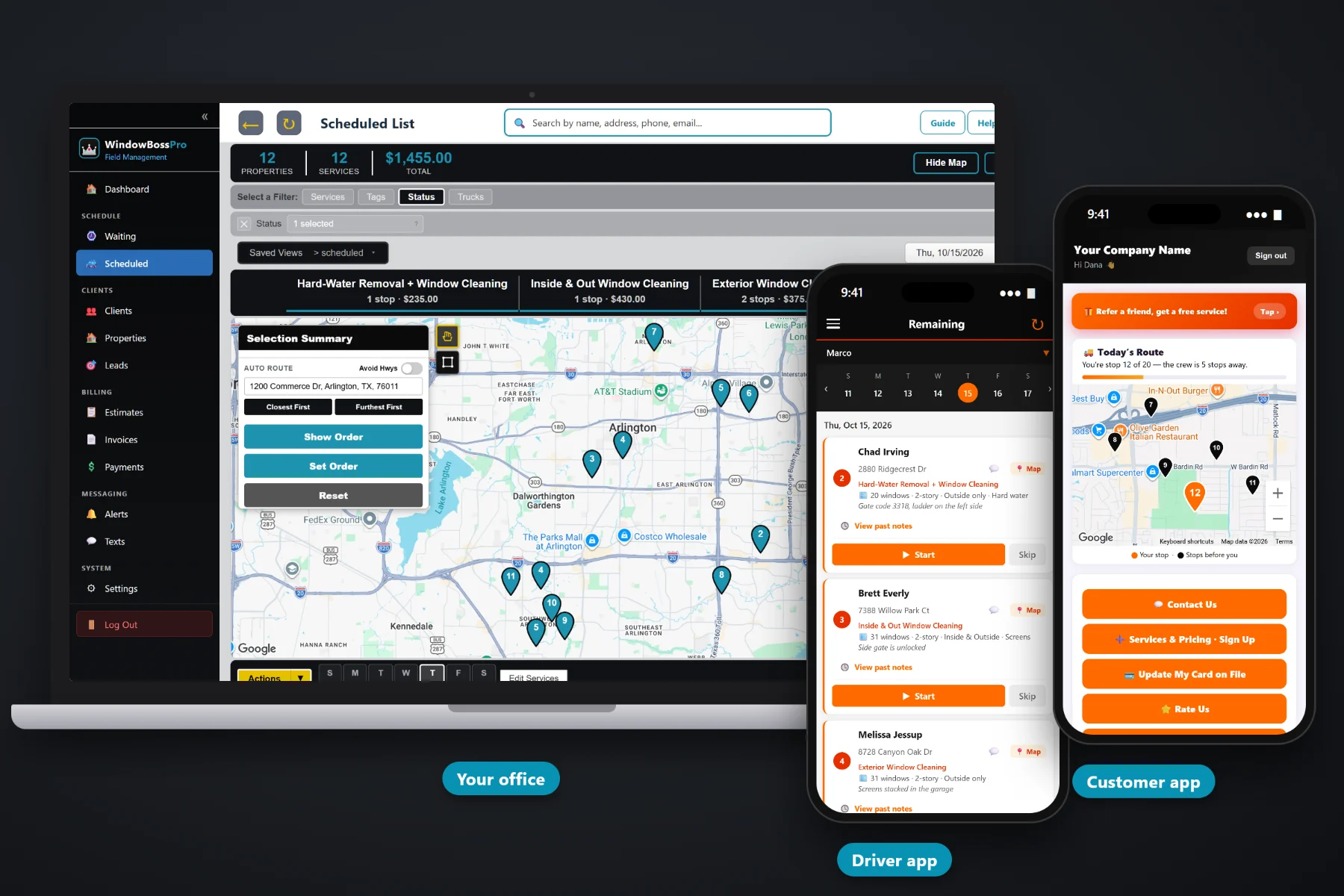
A window cleaning business starts with one ladder, one van and a notebook. It grows into storefront routes, quarterly homes, property managers and a second crew, and the notebook stops keeping up. WindowBossPro keeps every client, every address and every window count in one place, brings recurring cleanings due on their own, puts the day in route order on each tech's phone, and bills the card on file when the job is done.
Plans start at $59/month and you are never billed per user, so the owner, every tech and the person answering the phone all get a login. The clients, routes, tech app, quotes, texting and billing are one platform, not add-ons. For the full product tour, start at WindowBossPro. This page is about the business side: what to set up, what to watch and how to grow without losing track of the work.
Storefronts every two weeks or monthly, homes quarterly or twice a year. The Waiting List shows every cleaning that came due.
Filter the dispatch board by van, auto-route Closest First or Furthest First from the shop, and set the order by hand.
“28 windows · 2-story · Inside & Outside · Screens” under the address, plus gate codes and ladder notes.
Estimates from your service list. An approved estimate becomes scheduled services without retyping.
Complete creates the invoice and can charge the card on file. Property managers get one monthly statement.
Reminders, on-the-way and arrived texts go out on their own, and two-way texting keeps replies with the office.
The hard part of running a window cleaning business is not cleaning glass. It is knowing which storefront is past due for its visit, which quarterly home got forgotten, which van is running behind and which card declined last Tuesday. WindowBossPro puts those answers on screens you can check in a few minutes from the shop or the truck.
You do not need a consultant or a training course. Bring your customer list, your prices and your vans. WindowBossPro runs in the browser on the computer in the shop and on the iPhones and Android phones your techs already carry.
Upload a CSV of clients and addresses. One client can have many addresses, and imports place every address on the map.
Build your service list: per window, per screen, story add-ons, hard water. Set storefronts and homes on recurring plans.
Give each employee a personal PIN and a van. You are never billed per user, so everyone gets the app.
Pull due cleanings off the Waiting List, route each van, and let the techs work the day from their phones.
One owner with one van can keep the whole business in their head. The trouble starts when there are more quarterly homes than you can remember, a storefront route someone else drives, and invoices that go out whenever there is time on a Sunday night.
Ask an owner who grew past one van what went wrong first and you will hear a familiar list. A quarterly customer who called in month five asking whether they had been dropped. A storefront that got cleaned twice in one week and then skipped for three. Screens cleaned and never put on the invoice. A card that declined and nobody noticed for a month.
None of that is a cleaning problem. It is a record-keeping problem, and it grows with every new customer. When recurring work comes due on its own and every job carries its window details and price, the business stops depending on one person's memory.
WindowBossPro keeps the client, the address, the windows, the schedule and the invoice together, from the first quote to the paid card.
Every tool here exists to keep recurring work on schedule, vans full, extras billed and cards charged, whether you run one van or four.
Set plans by minimum days between visits: 14, 30, 90 or 180. They come due on their own.
Every cleaning that came due on a live map and list, colored not due, due now and overdue.
The Scheduled List shows jobs by day and filters by van, with auto-route from the shop.
Window count, stories, inside or outside, screens, tracks and hard water on every job.
Gate codes, dogs, skylights and where to set the ladder, under the address.
Company login plus PIN, jobs in route order, navigation, photos, Start / Skip / Complete and a time clock.
Estimates from your service list, approved online, turned into scheduled services.
Request and sign-up forms flow into Form Responses. One click turns a sign-up into a client.
Two-way texting from the office plus automatic reminders, on-the-way and arrived alerts.
Auto-charge on completion or on a schedule, with online payment in the customer app.
A property manager set to Monthly gets one statement covering every location, labeled by address.
Invoices with line items and sales tax, plus follow-up on what has not been paid.
Storefront, Residential, Quarterly, Commercial, or your own tags and fields.
Customers see their place on today's route, request service, update their card and pay.
Works in the US, Canada, Australia, New Zealand and the UK, billing in local currency.
Start $59, Pro $89 and Crew $199 per month. Every tech and office user included.
Most window cleaning businesses grow the same way. The owner fills one van with residential work, adds a storefront route to steady the cash, signs a property manager or two, and then needs a second van and someone to drive it. Each step adds customers the owner cannot hold in their head. WindowBossPro is set up for that path: tags to separate residential from storefronts, vans on the dispatch board, monthly statements for commercial accounts and employee PINs for every new tech. For the whole path in one read, start with Running a Window Cleaning Business: The Complete Guide From First Ladder to Second Van.
Window cleaning profit leaks out in small ways: screens that were cleaned but never billed, a quarterly visit that slid into the next quarter, a storefront that paid late for three months running. WindowBossPro prices jobs from your service list, so the screens and hard water are on the invoice. Complete creates the invoice and can charge the card on file. Commercial accounts set to Monthly get one statement for every location, and past-due invoices get followed up instead of forgotten.
Pick the plan that fits the size of your business. Every plan starts with a 14-day free trial and no credit card.
Compare plans on the pricing page.
Starting on software with your first customers means every address, window count and recurring plan is recorded from the beginning, so you never have to rebuild your records from a notebook later. Start is $59/month, and the 14-day free trial needs no credit card.
Each plan has a minimum number of days between visits, such as 14 or 30 for storefronts and 90 or 180 for homes. When a cleaning comes due it shows on the Waiting List map and list, colored due now or overdue past a 7-day grace, so nothing depends on someone remembering.
Yes. Tag clients as Residential, Storefront, Quarterly or Commercial, assign jobs to a van, and filter the Scheduled List by van. A common setup is one van on homes and one on a storefront route.
Set the account to Monthly billing and they receive one statement each month covering every location, with each line labeled by its address.
Yes. Import clients and addresses by CSV. Imports place every address on the map, and one client can hold many addresses.
Start is $59/month, Pro is $89/month, and Crew is $199/month. You are never billed per user, and every plan starts with a 14-day free trial with no credit card.
This page covers the business side of window cleaning. For the tech app, routing, quotes and the rest of the product, see the full WindowBossPro platform overview.
Practical reading on starting out, choosing software, pricing, residential and commercial work, hiring, safety, seasons, add-on services, marketing, the numbers to watch, profit leaks and growing past the owner's own ladder.
Recurring cleanings that come due on their own, routes by van, window details on every job, quotes customers approve and payment when the work is done. Try WindowBossPro free for 14 days.